
Hi, I’m Cameron. I’m a photographer, filmmaker and operations leader.
Currently the Director of Business Operations at Doodle Pirates Foundation. Former Executive Director of The Cultivation Project.
01 / Choose a path
What I do best
- 01
Building Systems
Internal tools, dashboards and automations I design and ship fast with AI agents, from the Internal Dashboard to contract automation.
Projects - 02
Operations
Running the business side of small teams since 2012, from founding two businesses to leading operations at Doodle Pirates Foundation.
Experience - 03
Creative Work
Photography, video and podcasting. 200+ clients served as a freelancer through Cosie Co., and 100+ documentaries, videos and podcast episodes produced with The Cultivation Project.
Creative
02 / Featured project · Doodle Pirates Foundation
An all-in-one Internal Dashboard, concept to production in under two weeks.
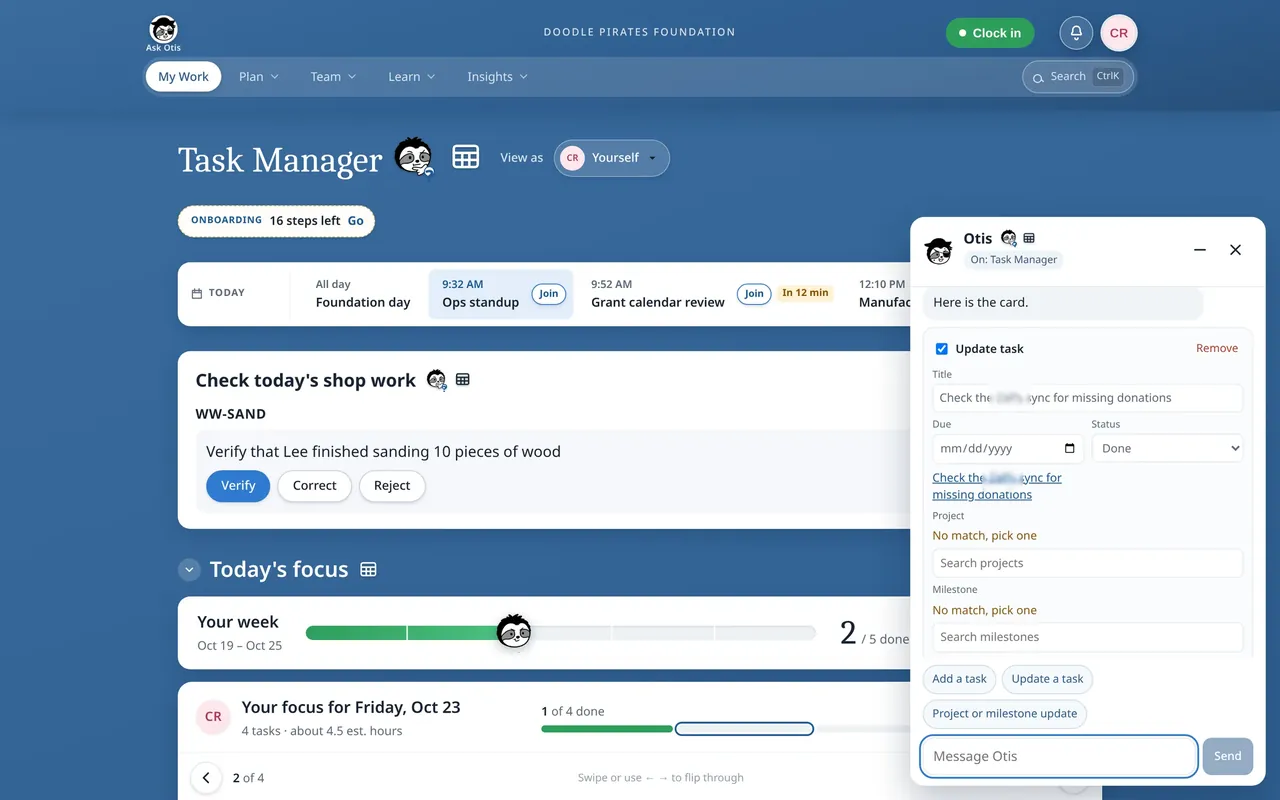
Designed by me and built fast with Cursor cloud agents on an Airtable ERP, including Ask Otis, a Claude-powered assistant with human-in-the-loop approval.
Under the hood
How the data flows
Text version of the diagram
- Team member (browser, phone or shop-floor kiosk) → Cloudflare Access. Sign-in with a work Google account, before anything else loads.
- Cloudflare Access → Dashboard (React + Vite). Signed-in requests. Each person’s Employee Level decides what they can see and do.
- Dashboard → API (Hono, on the same Cloudflare Worker). Requests such as a task, a shift or a PTO day.
- API → Airtable (source of truth). Reads, and writes after a permission check on the server.
- API → Google Docs. Documentation pages, which are real Google Docs. The live editor saves a few seconds after typing stops.
- API → Google Calendar (one way). Shifts, PTO and sick days, pushed after a schedule save, a “Resync this week” press or a shop job assignment. Out-of-office days and holidays stay off the calendar, and nothing is read back.
- Ask Otis (Claude-powered assistant) → A person, for approval. Editable cards: a new task, a task update, or a project or milestone update.
- Approve → API, then Airtable. Only what the person approved is written, after another permission check on the server.
- Separately, each person’s own Google Calendar → My Work. Today’s meetings, read-only and private to that person. This is not part of the schedule sync and isn’t drawn above.





04 / About
Hi, I'm Cameron Kuey. I sold candy bars in high school, and I've been building things ever since: businesses, stories, and lately, the systems and software that help teams do their best work.
Today I'm the Director of Business Operations at Doodle Pirates Foundation, a nonprofit that trains neurodivergent adults in real-world work skills. I design how the organization runs, then build the tools that run it. Read more about me.